Database
The database used is a lightweight MariaDB.
It is instantiated in a separate docker container defined in the docker-compose.yml file.
Structure
The Sales Point main functionality is based on the following database:
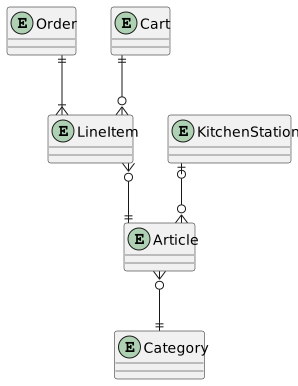
- Category is used to order the articles on the new order screen.
- KitchenStation defines who is preparing the article (Grill, Fritteuse, ..)
- A cart or order is defined by its line items. These handle the articles and their count.
- The printer table is missing on the image.
Migrations
When changing the database structure, Ruby on Rails uses Migrations.
Any existing database can be migrated using /bin/rails db:migrate.
See also the official documentation.
First time setup
When spinning up any mariadb container the first time, a user and empty database must be created. For successive startups these settings are stored in a docker volume. To do so login into the docker container and then:
- login with the root user:
mariadb -p, enter root password from docker-compose - create a user and database according to the env setting (see
config/database.yml) - create a new user:
create user <dptdb> identified by '<password>'; - create a new empty database:
create database dptDev; - add user to database:
grant all privileges on dptDev.* to dptdb@'%';
Initialize a new database
To initialize a new and clean database simply use the rails command bin/rails db:setup.
This also seeds the database with the defined seeds in db/seeds.rb.
Prior to this, the database and user has to be created inside the docker container.
Backup the data
Use the mariadb-dump tool in the container:
mariadb-dump  -p -x --databases dptDev > database.sql
mariadb-dump  -pASDF -x --databases dptDev > database.sql # where ASDF is the password of the user
Then copy it from the docker container to the host with
sudo docker cp sales-point_devcontainer-db-1:/home/database.sql ./database.sql